Grok Imagine Image 2.0 API pricing starts at $0.04 per image for 1K Low and reaches $0.08 for 2K Medium through xAI. The official pricing schedule has six resolution and quality tiers, while image editing adds $0.01 per reference image. At a 30% discounted output rate, the corresponding LinkModel prices range from $0.028 to $0.056 per image.
Choosing the wrong configuration can double your generation bill without necessarily improving the final result. At 10,000 images, xAI charges $400 for 1K Low versus $800 for 2K Medium. Editing inputs, retries, and unusable outputs can push the effective cost higher. The most useful comparison is not just price per generation, but cost per accepted image, resolution requirements, and the actual billing rules.
LinkModel offers a compelling way to lower Grok Imagine Image 2.0 output spending.** With the model's stated 30% discount, 2K Medium drops from $0.08 to $0.056 per image, saving $240 for every 10,000 outputs. LinkModel also provides pay-as-you-go access, a unified API for supported image, video, and language models, and a developer console for tracking usage and spending.
Grok Imagine Image 2.0 API Pricing: All Six Tiers Explained
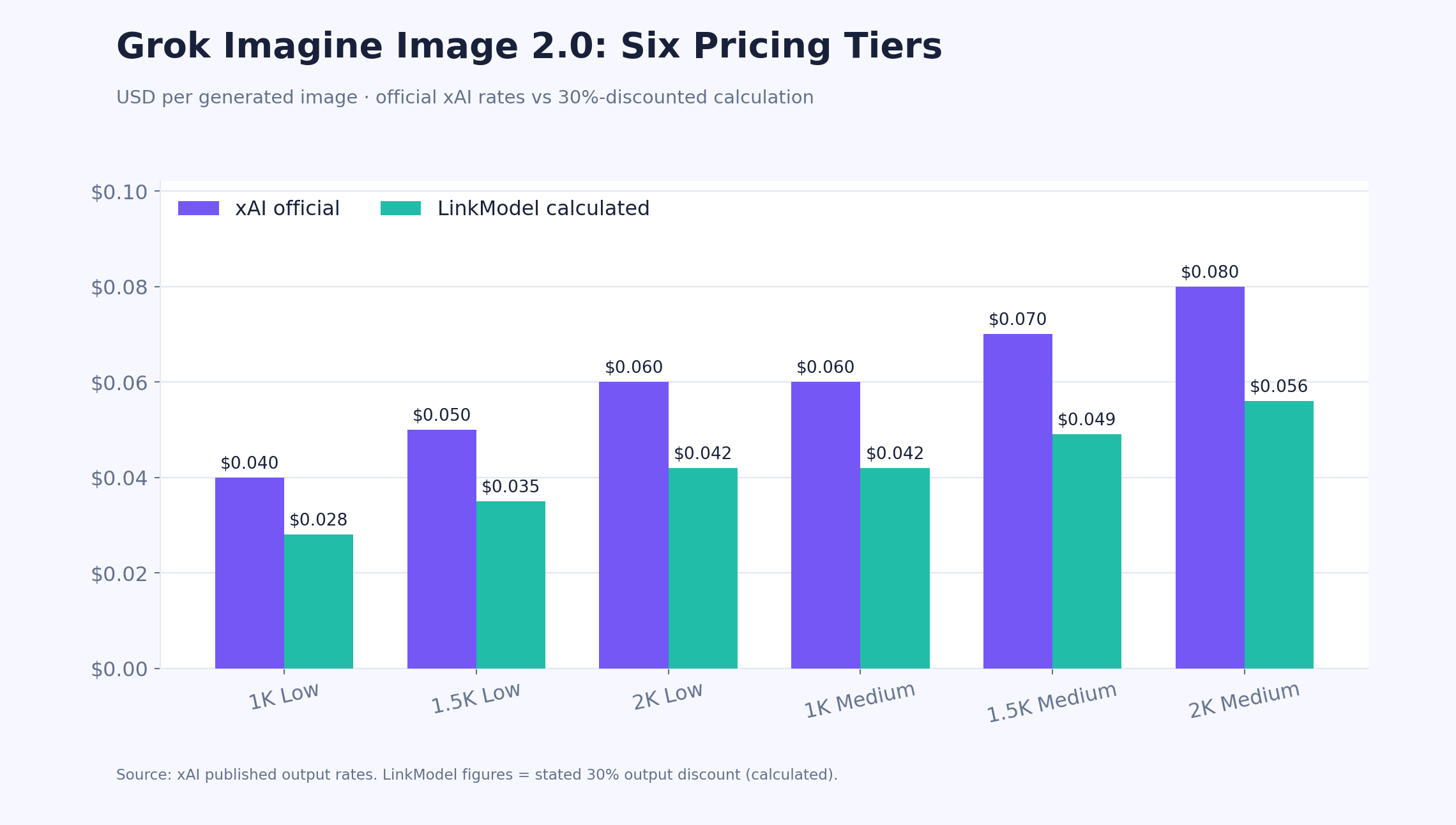
Grok Imagine Image 2.0 costs $0.04–$0.08 per generated image through xAI, depending on resolution and quality. The published pricing structure covers 1K, 1.5K, and 2K resolution tiers, each with Low and Medium quality pricing.
Unlike a flat-rate image API, this structure lets developers make a deliberate trade-off between output settings and cost.
The cheapest configuration is 1K Low at $0.04 per image. The most expensive published configuration is 2K Medium at $0.08 per image.
Official xAI vs LinkModel Pricing Table
| Resolution | Quality | xAI price/image | LinkModel 30%-off price | Savings/image |
|---|---|---|---|---|
| 1K | Low | $0.040 | $0.028 | $0.012 |
| 1.5K | Low | $0.050 | $0.035 | $0.015 |
| 2K | Low | $0.060 | $0.042 | $0.018 |
| 1K | Medium | $0.060 | $0.042 | $0.018 |
| 1.5K | Medium | $0.070 | $0.049 | $0.021 |
| 2K | Medium | $0.080 | $0.056 | $0.024 |
The xAI column contains official published rates. The LinkModel column shows the corresponding output prices calculated using the stated 30% model discount.
Three pricing patterns stand out.
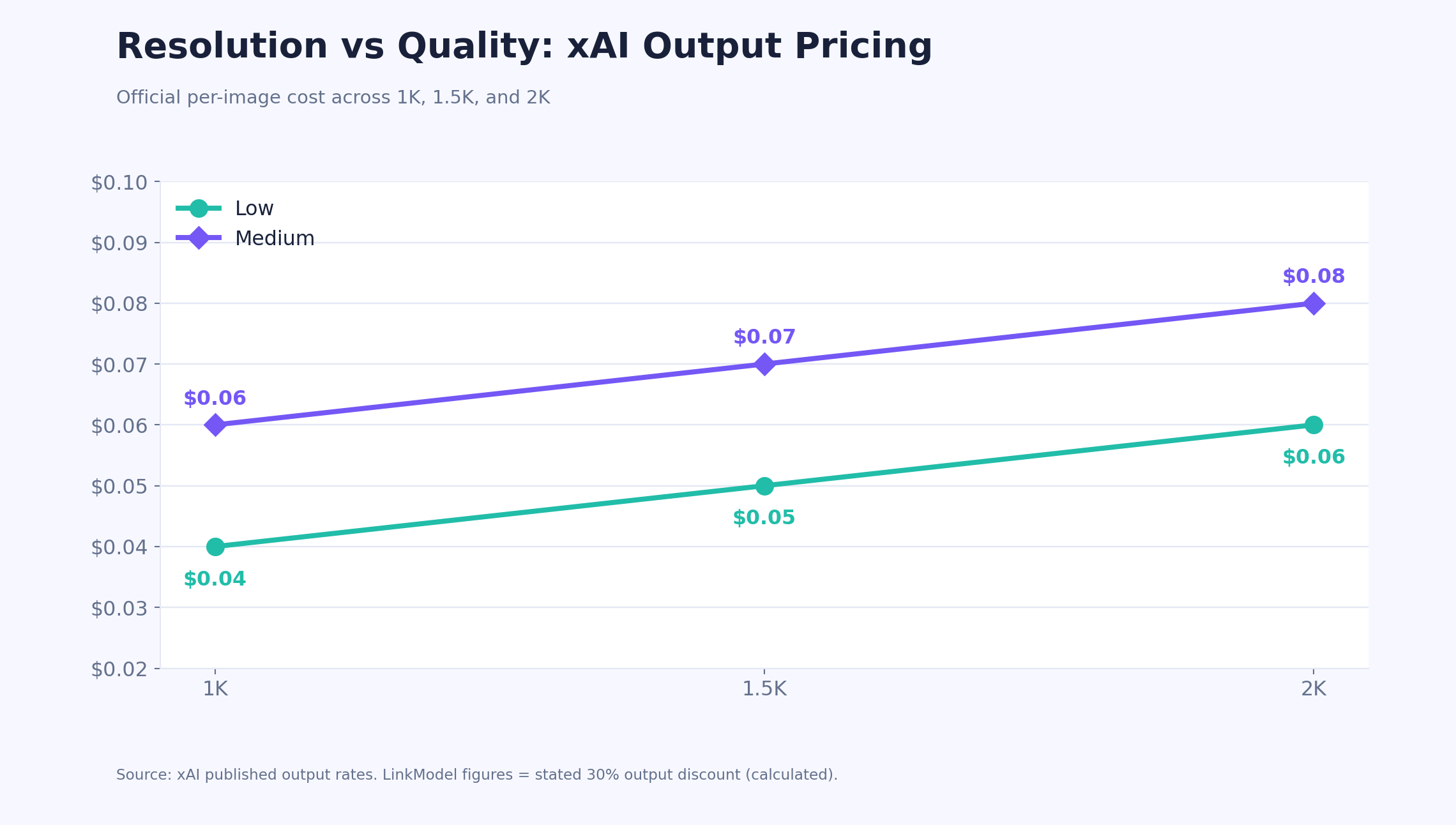
Resolution upgrades add $0.02 per output. Moving from 1K to 2K costs an additional $0.02 at either quality setting through xAI.
Medium quality adds another $0.02. This premium is consistent across all three published resolution tiers.
Different settings can share the same price. Both 2K Low and 1K Medium cost $0.06 through xAI. At the corresponding discounted rate, both cost $0.042.
That last comparison creates an important choice: should you pay for more pixels or additional generation compute?
The answer depends on the final image requirements, not the price alone.
How Grok Imagine Image 2.0 API Billing Works
For text-to-image generation, output spending is calculated by multiplying the number of generated images by the applicable output rate.
Total generation cost = Generated images × Price per image
For image editing, reference-image inputs are an additional cost.
Total editing cost = Output charges + Reference-image input charges
xAI lists an input charge of $0.01 per reference image.
For example, generating one 2K Medium image costs $0.08 through xAI.
Editing one reference image into a 2K Medium output costs $0.09, including the input charge.
Using five reference images increases that request's total to $0.13.
This is why an image-editing application should not estimate its spending using output prices alone.
Which Grok Imagine Image 2.0 Tier Is the Cheapest?
1K Low is the cheapest published tier at $0.04 per image through xAI, or $0.028 using the stated 30% discounted output rate.
It is a strong starting point for prompt exploration, concept drafts, thumbnails, and other workflows where maximum resolution is unnecessary.
However, cheapest per output does not always mean cheapest per usable asset.
A more expensive setting may reduce editing work or satisfy requirements that a cheaper setting cannot meet.
For production applications, compare the total cost of achieving an acceptable final image rather than automatically selecting the lowest advertised rate.
Grok Imagine Image 2.0 1K vs 2K: Which Resolution Is Worth the Price?
At Low quality, 2K costs 50% more than 1K; at Medium quality, it costs 33.3% more. The upgrade can be worthwhile when additional output detail, cropping flexibility, or larger display dimensions matter.
But a higher resolution does not automatically improve composition, typography, or prompt adherence.
1K vs 2K Pricing and Output Detail
| Setting | 1K xAI price | 2K xAI price | Increase |
|---|---|---|---|
| Low | $0.04 | $0.06 | 50% |
| Medium | $0.06 | $0.08 | 33.3% |
A square image at 1024 × 1024 contains approximately 1.05 million pixels.
A square image at 2048 × 2048 contains approximately 4.19 million pixels.
That is four times the pixel count.
These dimensions illustrate the scale of a resolution increase; actual generated dimensions depend on the API's supported aspect ratio and resolution configuration.
For images that will be displayed at a small size, the additional detail may provide little visible benefit.
For product hero images, editorial artwork, or visuals that require significant cropping, a higher-resolution output may be more useful.
The right question is whether the extra pixels survive into the final delivered asset.
Cost Scenario: 2,000 E-Commerce Product Images
Consider an e-commerce team preparing 2,000 product visuals for category pages, product listings, and promotional placements.
The following budget illustrates the difference between three output settings.
| Configuration | xAI total | LinkModel 30%-off total |
|---|---|---|
| 1K Low | $80 | $56 |
| 2K Low | $120 | $84 |
| 2K Medium | $160 | $112 |
Choosing 2K Low instead of 1K Low adds $40 through xAI or $28 at the discounted output rate.
That additional spending may be justified for hero images or assets requiring multiple crops.
It may be unnecessary for small product-listing thumbnails.
A more efficient production workflow would separate preview images from final deliverables.
Generate initial concepts at 1K Low, evaluate the composition, and reserve higher-resolution generation for assets that require it.
This scenario illustrates pricing decisions rather than reporting measured image-quality results.
When Should You Choose 1K or 2K?
Choose 1K when cost matters more than maximum detail, particularly for drafts, thumbnails, concept selection, and rapid creative exploration.
Choose 2K when the image must support larger placements, more detailed inspection, or substantial cropping.
Before upgrading, inspect the output at the size customers will actually see.
If the 1K result already satisfies the requirements, paying for 2K may not improve the final experience.
If detail loss is visible or the asset needs more cropping flexibility, the higher tier becomes easier to justify.
Resolution should follow the delivery requirement, not the assumption that bigger is always better.
Grok Imagine Image 2.0 Low vs Medium Quality: Is Medium Worth Paying For?
Medium quality costs $0.02 more per generated image than Low at every published resolution. It allocates more generation compute, but that does not guarantee better results for every prompt.
The relevant decision is whether the additional compute improves the output enough to justify the premium.
Low vs Medium Price Difference
| Resolution | Low | Medium | Additional cost |
|---|---|---|---|
| 1K | $0.04 | $0.06 | $0.02 |
| 1.5K | $0.05 | $0.07 | $0.02 |
| 2K | $0.06 | $0.08 | $0.02 |
At 1K, Medium is 50% more expensive than Low.
At 2K, Medium is 33.3% more expensive.
For 10,000 outputs, upgrading from Low to Medium adds $200 through xAI, regardless of the selected published resolution tier.
At a 30% discounted output rate, the same upgrade adds $140.
That makes quality selection particularly important for applications generating thousands of images.
Cost Scenario: 5,000 Marketing Images
Suppose a marketing team generates 5,000 images for advertisements, social media, and campaign concepts.
At 1K Low, the output budget is $200 through xAI.
At 1K Medium, it increases to $300.
Using the corresponding 30%-discounted rates, the totals are $140 and $210.
The quality upgrade costs an additional $70–$100 for this workload, depending on the provider rate.
Whether that spending is worthwhile depends on the results.
For example, a team producing final campaign artwork may value fewer visible defects, better detail, or less manual editing.
A team exploring dozens of visual concepts may benefit more from generating inexpensive alternatives.
These are different objectives and should not be evaluated using one universal quality setting.
Cost per Accepted Image: The Metric That Matters
An image-generation workflow rarely treats every output as equally useful.
Some images may be rejected because of incorrect composition, inconsistent product details, unwanted changes, or poor instruction adherence.
The practical cost of production therefore depends on how many outputs are accepted.
Cost per accepted image = Total generation spending ÷ Number of accepted images
Consider a hypothetical workflow using 1K Low at a discounted output price of $0.028.
If 80% of the images are accepted, the effective cost is:
$0.028 ÷ 0.80 = $0.035 per accepted image
Now compare 1K Medium at $0.042.
Even with a perfect 100% acceptance rate, Medium would cost $0.042 per accepted image.
In this scenario, Medium cannot beat Low on generation cost per accepted image alone.
Medium could still deliver greater business value if it reduces manual editing or produces assets that Low cannot reliably deliver.
The acceptance rates above are illustrative assumptions, not measured Grok Imagine Image 2.0 benchmarks.
The best quality tier is the one that minimizes total production cost while meeting the required output standard.
How Auto Quality Changes API Pricing
Grok Imagine Image 2.0 also supports an Auto quality setting.
According to xAI's current documentation, Auto uses different quality levels for generation and editing.
| Request type | Current Auto behavior | Pricing implication |
|---|---|---|
| Text-to-image generation | Low | Low output rate |
| Image editing | Medium | Medium output rate plus reference inputs |
For example, a 1K generation using Auto currently costs $0.04 through xAI.
A 1K edit using Auto and one reference image costs $0.07, including the $0.01 input charge.
That is a substantial difference for two requests that both appear to use the default quality setting.
Explicitly selecting Low or Medium makes production spending more predictable.
Because Auto behavior can evolve, developers should also record the quality actually served and reconcile it with usage charges.
Grok Imagine Image 2.0 Cost Calculator: 100 to 10,000 Images
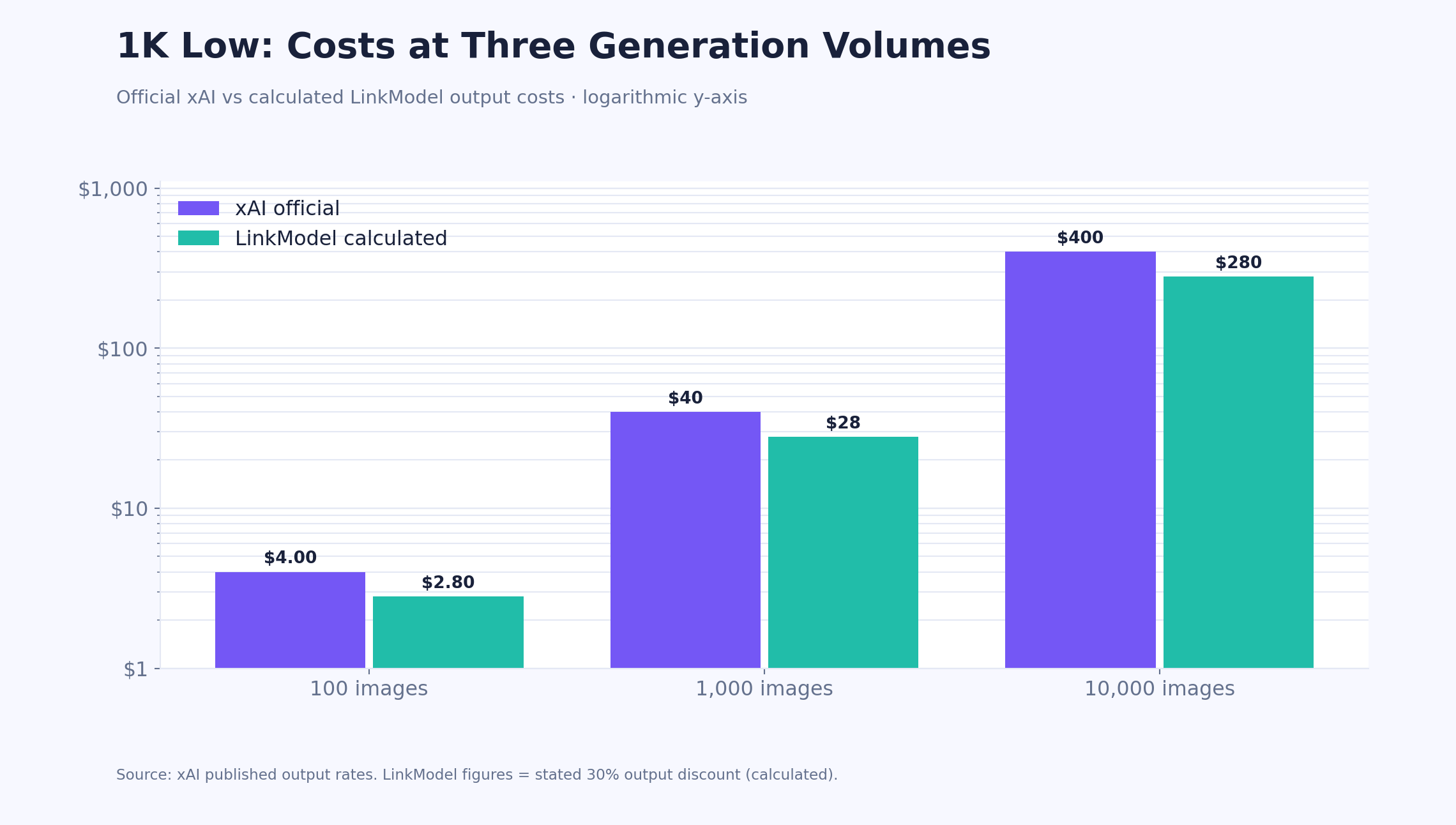
At official xAI rates, 10,000 Grok Imagine Image 2.0 outputs cost $400 at 1K Low or $800 at 2K Medium. At the corresponding 30%-discounted output rates, those totals become $280 and $560.
These figures provide a useful starting point for monthly budgets, but real production spending also depends on editing inputs and rejected outputs.
Grok Imagine Image 2.0 Bulk Cost Comparison
| Workload | xAI cost | LinkModel 30%-off cost | Savings |
|---|---|---|---|
| 100 images, 1K Low | $4.00 | $2.80 | $1.20 |
| 1,000 images, 1K Low | $40 | $28 | $12 |
| 1,000 images, 2K Low | $60 | $42 | $18 |
| 1,000 images, 2K Medium | $80 | $56 | $24 |
| 10,000 images, 1K Low | $400 | $280 | $120 |
| 10,000 images, 2K Medium | $800 | $560 | $240 |
These calculations cover generated-image output charges and assume the stated discount applies to the selected output configuration.
Cost Scenario: A SaaS Generating 10,000 Images per Month
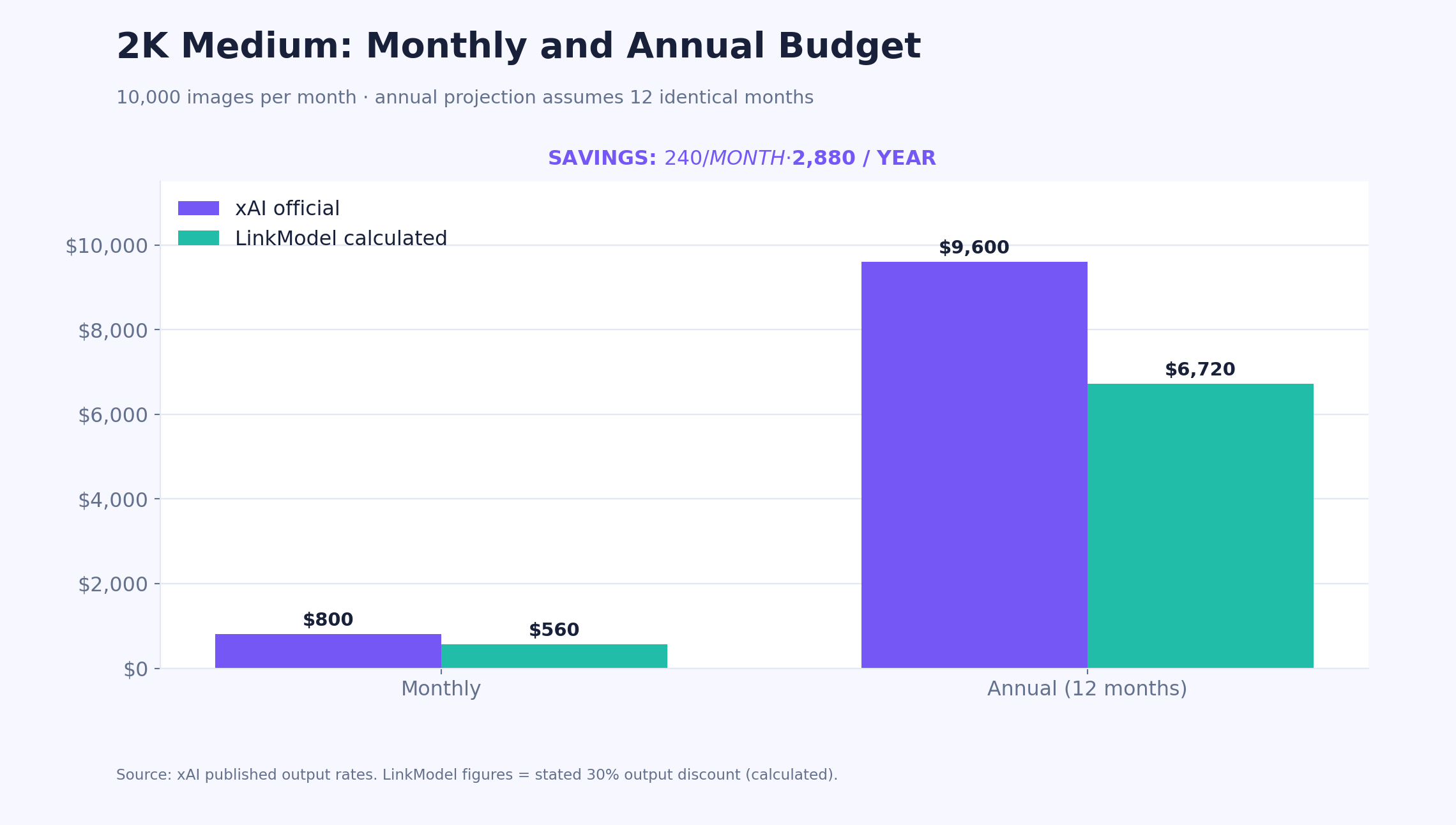
Consider a SaaS application producing 10,000 images per month at 2K Medium.
At xAI's $0.08 output rate, monthly generation spending is $800.
At the corresponding $0.056 discounted output rate, spending falls to $560.
That creates a difference of:
$240 per month, or $2,880 per year
The annual estimate assumes the same monthly volume and unchanged pricing.
Another way to evaluate the difference is through output capacity.
A $560 generation budget covers 7,000 images at $0.08 each.
At $0.056 per image, the same budget covers 10,000 images.
That is 3,000 additional outputs within the same generation budget.
For an application with recurring image demand, lower unit costs can create room for additional customer usage, better margins, or more experimentation.
Cost Scenario: What Happens When 25% of Images Are Rejected?
Now consider a workflow generating 1,000 images at 2K Medium.
Assume 750 are accepted and 250 are rejected.
The acceptance rate is 75%.
| Metric | xAI | LinkModel 30%-off rate |
|---|---|---|
| Generated images | 1,000 | 1,000 |
| Accepted images | 750 | 750 |
| Output spending | $80 | $56 |
| Effective cost per accepted image | $0.1067 | $0.0747 |
The 75% acceptance rate is a modeling assumption, not an observed Grok Imagine Image 2.0 success rate.
The example demonstrates how unusable generations can change the economics.
A $0.08 output effectively costs approximately $0.1067 per accepted image when only three out of four outputs are usable.
That difference can matter more than a small change in the advertised price.
For production budgeting, track generated outputs, accepted outputs, editing attempts, and actual charges.
Optimizing for accepted-image cost gives a more realistic view of API value than optimizing for the cheapest individual request.
Grok Imagine Image 2.0 Editing Pricing: Reference Images and Revisions
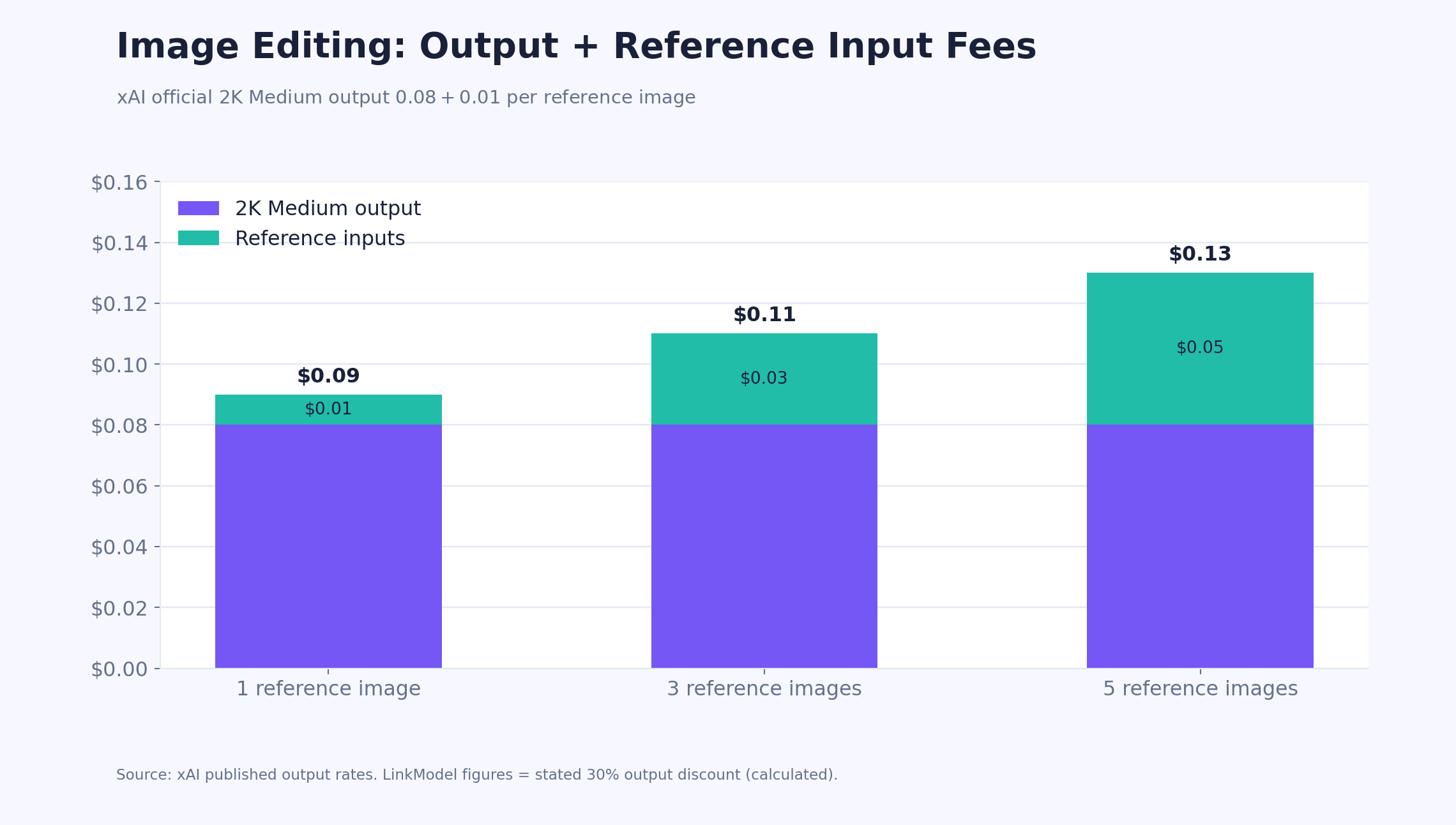
Grok Imagine Image 2.0 image editing adds $0.01 per reference image under xAI's official pricing. The model supports editing with up to five reference images, allowing workflows that combine or modify existing visual material.
For editing-heavy applications, input-image charges can represent a meaningful portion of the total request cost.
Editing Cost with One to Five Reference Images
| Editing request | Output charge | Input charge | Total xAI cost |
|---|---|---|---|
| 1 reference, 1K Low | $0.04 | $0.01 | $0.05 |
| 1 reference, 1K Medium | $0.06 | $0.01 | $0.07 |
| 1 reference, 2K Medium | $0.08 | $0.01 | $0.09 |
| 3 references, 2K Medium | $0.08 | $0.03 | $0.11 |
| 5 references, 2K Medium | $0.08 | $0.05 | $0.13 |
For a 2K Medium edit, moving from one reference image to five increases the official total request cost from $0.09 to $0.13.
That is a 44.4% increase even though the output tier remains unchanged.
A provider discount on generated outputs does not automatically imply the same discount on reference-image inputs.
Cost Scenario: Editing with Five Product References
Consider a product-marketing workflow using five reference images to create one final 2K Medium visual.
The references might define product appearance, packaging, surface material, lighting, and composition.
At official xAI rates:
Five reference images cost $0.05.
One 2K Medium output costs $0.08.
Total request cost: $0.13.
For 1,000 such requests, the official cost is $130.
At a discounted output rate of $0.056, the output component would be $56 across 1,000 requests.
If the provider applies the same $0.01 per-reference input fee, the additional input cost would be $50, bringing the combined total to $106.
The actual combined LinkModel editing charge depends on its applicable input-image billing.
This distinction is important when comparing providers: output savings and total editing savings are not necessarily identical.
Editing vs Regeneration: Which Costs Less?
Editing is useful when the existing image already contains details that must be preserved.
For example, a product photo may have the correct composition and packaging but need a different background.
Regeneration may be preferable when the entire concept needs to change.
At official xAI rates, one 2K Medium edit using one reference costs $0.09.
Three separate 1K Low generations cost $0.12.
If the edit succeeds immediately while regeneration requires three attempts, editing is cheaper in this scenario.
However, if the edit itself requires several revisions, its total cost can become higher.
The decision should depend on the expected number of attempts and the importance of preserving existing image details.
What Should You Check Before Using Grok Imagine Image 2.0 for Editing?
Image-editing quality should be evaluated separately from text-to-image generation.
A result may look visually polished while failing to preserve the original subject.
For portraits, inspect facial identity, skin texture, clothing, and lighting.
For product photography, inspect logos, packaging, proportions, and material consistency.
For localized edits, check whether the model changed unrelated parts of the image.
These checks matter because a visually attractive output can still be unsuitable for a real production task.
A useful editing benchmark measures what changed, what stayed consistent, and whether the final result satisfies the requested edit.
Grok Imagine Image 2.0 API: Real-World Performance and Cost Considerations
API price alone cannot establish image quality, speed, or reliability. A lower-cost request may be less economical if it requires additional retries, produces an unusable output, or takes too long for the intended application.
Developers evaluating Grok Imagine Image 2.0 should test both the model configuration and the provider through which it is accessed.
How to Evaluate 1K vs 2K Generation Speed
Higher resolution can affect processing requirements, but a specific speed difference should not be assumed without testing.
A useful comparison uses the same prompt across four configurations:
| Configuration | Main evaluation goal |
|---|---|
| 1K Low | Lowest-cost baseline |
| 1K Medium | Additional compute at 1K |
| 2K Low | Additional resolution without Medium |
| 2K Medium | Premium output configuration |
For each request, record the selected parameters, actual output dimensions, completion time, API charge, and whether the image meets the task requirements.
Repeat each configuration enough times to distinguish occasional slow requests from typical behavior.
Do not compare one unusually fast 1K request with one unusually slow 2K request and treat the difference as a universal benchmark.
The same principle applies when comparing providers.
Network conditions, concurrency, provider infrastructure, and request handling can affect end-to-end latency.
What Makes an Image Output Production-Ready?
Different applications require different acceptance criteria.
For product photography, useful criteria include packaging consistency, material detail, accurate proportions, and background quality.
For advertising posters, typography accuracy, visual hierarchy, and instruction compliance may matter more.
For portraits, natural skin texture, facial consistency, and believable lighting are important.
For complex illustrations, evaluate the relationships between objects, scene coherence, and adherence to the requested composition.
A simple acceptance checklist can help teams make consistent decisions.
Production-ready does not mean the image looks impressive at first glance. It means the image satisfies the actual task.
This distinction is particularly important when deciding whether to pay for Medium quality or higher resolution.
Why Provider Reliability Matters as Much as Price
A provider's advertised rate does not describe the entire user experience.
Before moving a production workload, confirm that the provider supports the intended model version, resolution settings, quality parameters, and editing capabilities.
Check how usage is recorded, how request errors are handled, and whether the service exposes enough information to investigate unexpected charges.
For applications with time-sensitive generation, response latency and rate limits may also affect user satisfaction.
A cheaper provider can be an excellent choice, but the financial benefit should be evaluated alongside actual request behavior and the total cost of delivering successful outputs.
Grok Imagine Image 2.0 API Setup, Rate Limits, and Batch Pricing
The official xAI model identifier is grok-imagine-image-2.0. Developers can access image generation and editing through the xAI API, while supported third-party providers may expose the model through their own integration interfaces.
Before deployment, confirm that the chosen provider supports the parameters required by your application.
Grok Imagine Image 2.0 API Specifications
| Feature | Official xAI specification |
|---|---|
| Model ID | grok-imagine-image-2.0 |
| API base URL | https://api.x.ai/v1 |
| Image generation endpoint | /v1/images/generations |
| Image editing endpoint | /v1/images/edits |
| Quality options | Low, Medium, Auto |
| Documented generation resolutions | 1K, 2K |
| Additional published pricing tier | 1.5K |
| Maximum reference images | 5 |
| Batch API | Supported |
| Model regions | us-east-1, us-west-2 |
The official pricing table includes a 1.5K tier, while the current generation documentation explicitly describes 1K and 2K request values.
Developers should verify the selectable resolution parameters in the exact API interface they plan to use rather than assuming that every published price tier is exposed identically through every integration.
How to Start Using Grok Imagine Image 2.0 Through LinkModel
LinkModel provides a unified API platform for supported image, video, and language models.
For developers considering the service, a practical evaluation sequence is:
1. Create a LinkModel account and API key. LinkModel provides a developer console for managing access and monitoring usage.
2. Locate Grok Imagine Image 2.0 in the model catalog. Confirm the exact model identifier, supported parameters, and applicable output pricing.
3. Choose the intended output settings. Start with 1K Low for a cost-controlled baseline, then evaluate 2K or Medium if the application requires them.
4. Generate a small test batch. Compare actual output dimensions, visual results, response times, and recorded charges.
5. Review usage and spending. Check whether the recorded charges match the expected output and input billing.
6. Scale gradually. Increase request volume after confirming that the model and provider satisfy your production requirements.
This approach limits the financial risk of adopting a new provider.
It also provides concrete evidence for deciding whether the lower output rate delivers sufficient value.
Grok Imagine Image 2.0 Rate Limits and Batch API
xAI publishes rate limits that depend on account usage tier.
The model's documented base-tier limit is 6 requests per second, with higher limits potentially available according to account eligibility and approved increases.
A request-per-second limit is not the same as completed-image throughput.
Actual performance also depends on processing time, concurrency, and the number of outputs requested.
Grok Imagine Image 2.0 supports Batch API processing, but xAI does not list a discounted image-generation batch rate.
Do not apply text-model batch discounts to image output pricing.
Batch processing may still be useful for asynchronous workloads, even when the per-image price remains unchanged.
How to Track Actual API Charges
For production workloads, estimated pricing should be reconciled against actual usage records.
xAI documents a usage cost field named cost_in_usd_ticks, where 10 billion ticks equal one US dollar.
For example, 400 million ticks represent $0.04.
LinkModel also describes a developer console with real-time usage, spending information, and detailed call logs.
These capabilities are useful for checking whether an application's actual spending matches its budget assumptions.
A practical monitoring process should record model version, output settings, input-image count, successful outputs, response times, and charged amounts.
A reliable billing history is more valuable than relying indefinitely on a static pricing estimate.
LinkModel vs xAI: Is the 30% Discount Worth It?
At the stated 30% discounted output rates, LinkModel is cheaper than xAI's official Grok Imagine Image 2.0 prices across all six calculated tiers. The savings are straightforward, but price alone is not enough to determine whether a provider is the right production choice.
Developers should also evaluate model availability, parameter support, billing clarity, and the experience of making actual requests.
LinkModel vs xAI: What Is the Real Price Advantage?
At 1K Low, xAI charges $0.04 per generated image.
The corresponding 30%-discounted LinkModel rate is $0.028.
At 2K Medium, xAI charges $0.08.
The discounted rate is $0.056.
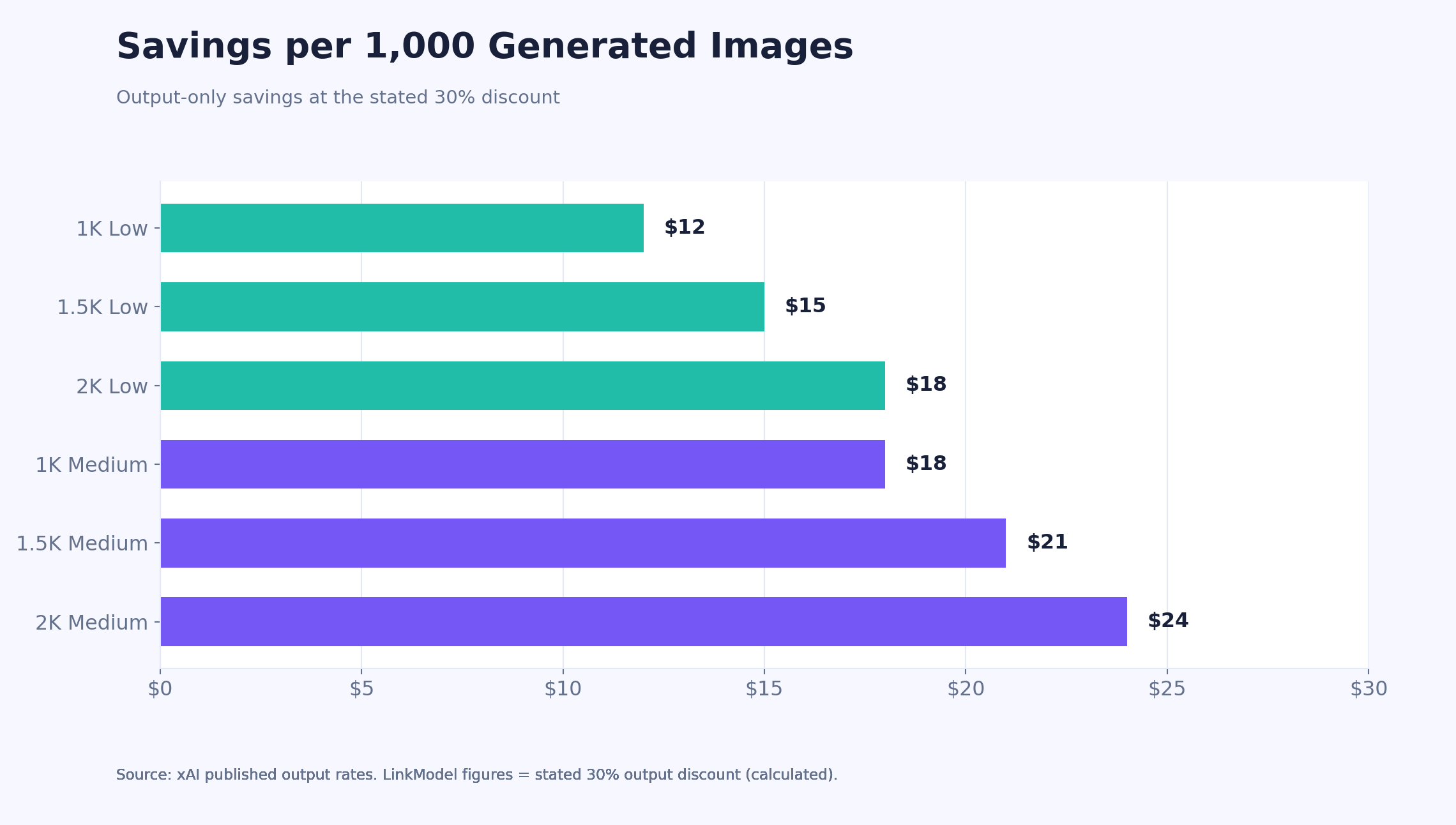
That represents $12–$24 in output savings per 1,000 images, depending on the selected tier.
For a business generating 10,000 images monthly at 2K Medium, the modeled savings reach $240 per month.
The strongest financial argument for LinkModel is lower recurring output spending under equivalent model settings.
However, a lower rate should be evaluated alongside actual input charges, supported configurations, and operational requirements.
What Should You Verify Before Choosing an API Provider?
A fair comparison should answer five questions.
Is it the same model? Confirm that the provider exposes Grok Imagine Image 2.0 rather than an earlier Grok Imagine model.
Are the output settings equivalent? Check resolution, quality, aspect ratio, and editing parameters.
What does the complete request cost? Include output charges, reference-image inputs, and any applicable additional fees.
Can you inspect actual usage? Clear records make it easier to reconcile estimates and identify unexpected charges.
Does the integration fit your application? Consider authentication, API compatibility, rate limits, error handling, and deployment requirements.
These checks prevent misleading comparisons between a cheap but unspecified output and a higher-quality or higher-resolution configuration.
The best provider is not necessarily the one with the lowest advertised starting price. It is the one that delivers the required output at an acceptable total cost and operational risk.
Why LinkModel Can Be Attractive for Multi-Model Applications
LinkModel's value proposition extends beyond the Grok Imagine Image 2.0 output discount.
Its platform offers unified access to supported language, image, and video models through one API ecosystem.
That can be useful for products combining multiple AI capabilities.
For example, a marketing application may use a language model to draft campaign copy, an image model to create promotional visuals, and a video model to produce short advertisements.
A unified provider can simplify parts of model access, account management, and usage tracking.
LinkModel also advertises pay-as-you-go pricing without a monthly platform fee or minimum spend, making it relevant to developers who want to begin with small workloads before scaling.
API Pricing vs Grok Consumer Subscriptions
A consumer Grok subscription and a programmable image API serve different purposes.
Consumer subscriptions provide access to product features subject to plan allowances and restrictions.
An API provides programmatic access with usage-based charges.
For example, 1,000 images at 1K Low cost $40 through xAI's API at the published rate, or $28 at the corresponding discounted output rate.
A subscription cannot be assigned an equivalent cost per image without knowing its actual allowances, restrictions, and automation capabilities.
For SaaS products, automated creative pipelines, and applications requiring predictable usage-based billing, API pricing is the more relevant comparison.
Frequently Asked Questions
How much does Grok Imagine Image 2.0 API cost per image?
Grok Imagine Image 2.0 costs $0.04–$0.08 per generated image through xAI. The lowest tier is 1K Low at $0.04, while 2K Medium costs $0.08. At the stated 30% LinkModel output discount, the corresponding prices range from $0.028 to $0.056 per image.
Is Grok Imagine Image 2.0 2K better than 1K?
2K offers a higher resolution tier and can be useful for larger images, detailed assets, and cropping. At Low quality, it costs $0.06 through xAI compared with $0.04 for 1K. Choose 2K when the final output requires additional detail, not simply because it is available.
Is Low or Medium quality better for Grok Imagine Image 2.0?
Low is cheaper, while Medium allocates more compute and costs an additional $0.02 per output at official xAI rates. The better choice depends on the task and the value of the final image. Compare cost per accepted image and actual output quality rather than assuming Medium always provides better value.
Does Grok Imagine Image 2.0 charge extra for image editing?
Yes. xAI charges $0.01 per reference image in addition to the generated output price. For example, editing one reference image into a 2K Medium output costs $0.09 at official rates. The model supports up to five reference images, so multi-reference editing can cost more.
Is Grok Imagine Image 2.0 cheaper through LinkModel?
At the stated 30% output discount, LinkModel's corresponding prices are $0.028–$0.056 per image, compared with xAI's $0.04–$0.08. For 10,000 images at 2K Medium, the modeled output cost is $560 instead of $800, saving $240. Total editing costs also depend on applicable input-image charges.
Conclusion
Grok Imagine Image 2.0 API pricing ranges from $0.04 to $0.08 per generated image through xAI, with six published resolution and quality tiers and an additional $0.01 charge per reference image for editing. 1K Low offers the lowest generation price, 2K provides greater resolution capacity, and Medium adds compute at a higher cost. The most economical configuration depends on the final asset requirements, accepted-image rate, editing workload, and actual usage charges. For developers generating images at scale, choosing appropriate settings and monitoring total production costs are just as important as selecting a provider. LinkModel offers a 30% discounted output-price proposition for this model, bringing the calculated range to $0.028–$0.056 per image and reducing a 10,000-image 2K Medium output budget from $800 to $560. Combined with pay-as-you-go access and a unified multi-model API platform, it provides a practical option for developers seeking lower Grok Imagine Image 2.0 generation costs.